← blog · May 6, 2026 · 4 min read
Building Interactive Workshop Manuals with Claude
Turning decades-old car workshop PDFs into searchable, clickable, mobile-friendly manuals. Claude Code to design the extraction, the Anthropic batch API to run it at scale, and a custom annotation tool to keep a human in the loop.
$ bloat--level 3Bloatin'
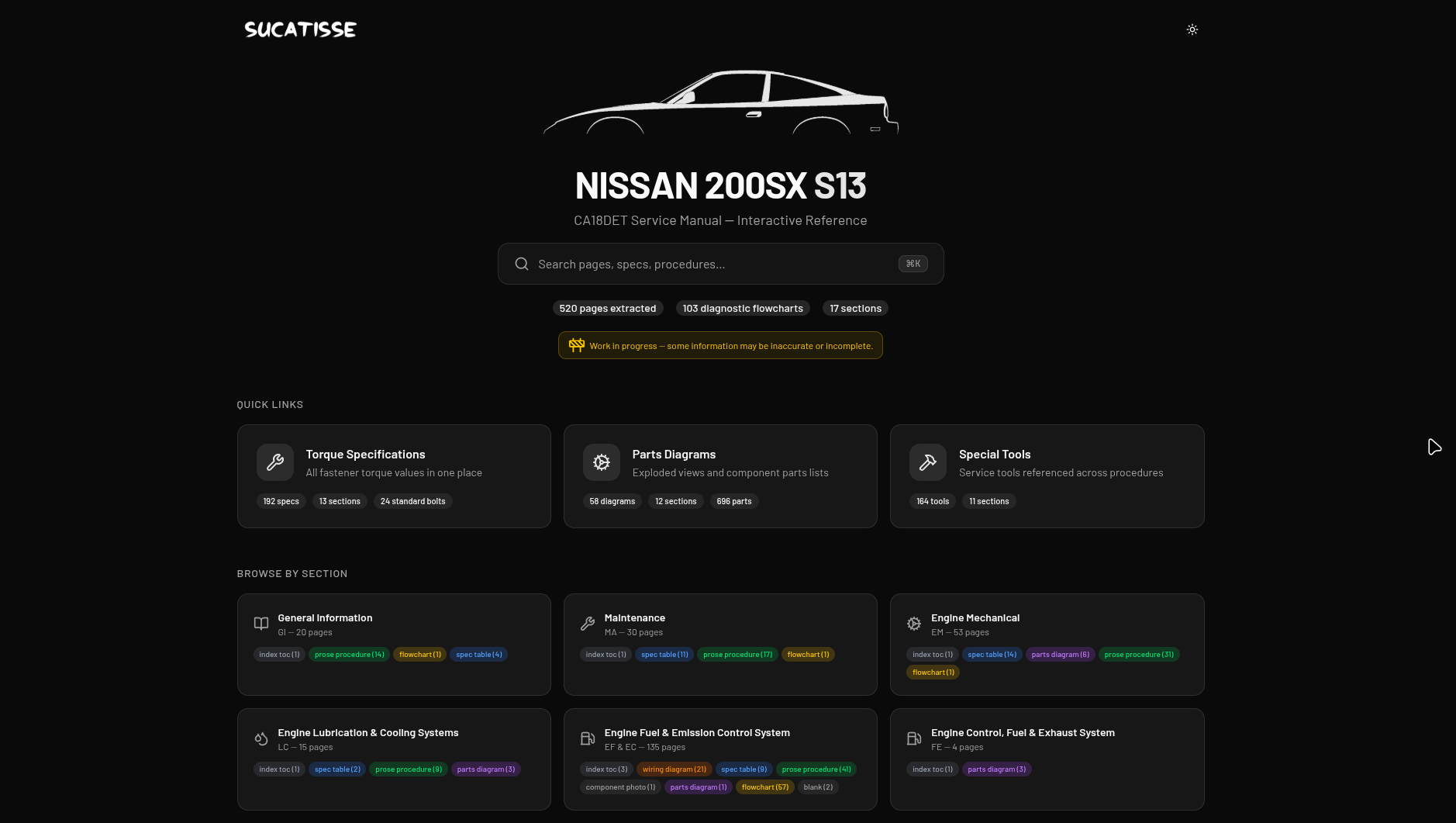
A while back I bought a Nissan 200sx. Naturally, the only proper repair info that exists is a 500-page workshop manual scanned out of a 1990s binder, full of grainy diagrams and torque tables that you navigate with Cmd+F and a lot of patience. So I started building the thing I wanted: a real, clickable, searchable, mobile-friendly version of that manual.
That side project grew an umbrella name, sucatisse (Portuguese-flavoured slang for “scrappy stuff”), and now hosts two manuals so far:
- s13.sucatisse.com: Nissan 200sx (S13)
- k11.sucatisse.com: Nissan K11
Same codebase, same pipeline, different car. This post is the first in what’ll probably be a small series. Here’s the high-level shape of how the sausage gets made.
The shape of the data
Workshop manuals look simple from across the room and get scary up close. Pages are dense, figure-heavy, and cross-referenced by code (FA-3 for Front Axle page 3, EM-12 for Engine Mechanical page 12, etc.). A typical page mixes a torque table, a numbered exploded diagram, a step-by-step procedure that points back at the diagram, and a fault-finding flowchart, all on one A4.
Pure OCR turns that into a wall of text and loses everything that made it useful. What I actually want is structured blocks: a procedure, a specs table, a flowchart, a parts_diagram, a wiring_schematic. Things the frontend can render as first-class UI instead of dumping back the original photocopy.
Which is exactly the kind of job Claude is good at.
The pipeline
The flow ended up being an iterative loop, not a one-shot batch:
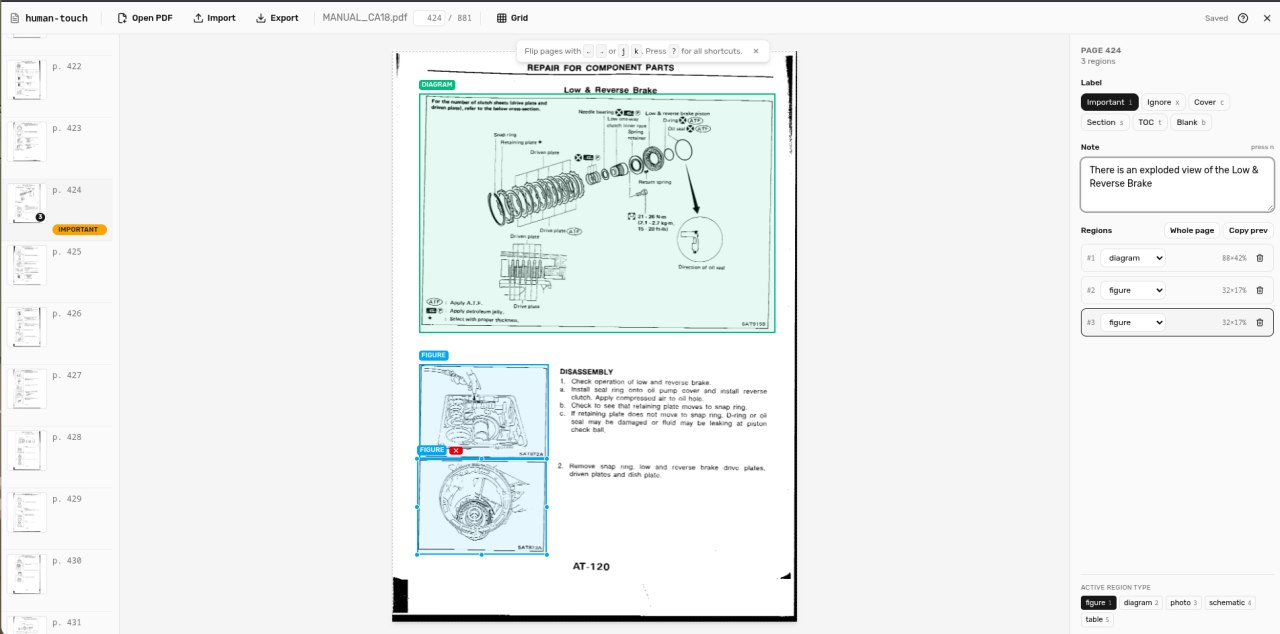
- Annotate the PDF in a custom tool I built called human-touch (more on that in a sec). Mark cover/index/blank pages as ignore. Draw bounding boxes around figures so the extractor knows what to pull out as images. Drop notes on weird pages.
- Design the extraction with Claude Code. I’d point Claude Code at a small handful of representative pages and iterate on the prompt and the target JSON schema interactively. Claude Code is brilliant for this. It’s the fastest way I’ve found to converge on “the prompt that produces the JSON I actually want” without burning real money on bad batch jobs.
- Run the Anthropic batch API over the rest of the manual. Once the prompt is dialled in, batching is a no-brainer for this workload: ~50% cheaper per token, and throughput genuinely doesn’t matter when you’re queueing 500+ pages and going to bed. Each page becomes one batch request, output is one structured JSON file.
- Spot-check the output. Open the rendered manual, click through. Find the page where the model dropped a figure, mis-labelled a torque value, or hallucinated a step that wasn’t there.
- Loop back into human-touch. Tighten the figure box, leave a note for the extractor (“the spec table on this page has a footnote, include it”), and re-run just that page through the API. Repeat until the diff between runs stops being interesting.
Two things made this loop work in practice: Claude Code for the design phase, and human-touch for the correction phase.
human-touch: the missing piece
human-touch is a small Vite + React SPA I built specifically for the annotation half of the loop.
It loads a PDF entirely client-side via pdfjs-dist, lets me label each page (important / ignore / cover / section_divider / index_toc / blank), draw bounding boxes around figures with a label (figure / diagram / photo / schematic / table), and leave free-text notes that flow through to the extractor. Everything is auto-saved to OPFS (the browser’s Origin Private File System), fingerprinted by the PDF’s hash, so my annotations survive reloads without ever leaving the laptop. There’s an export button that spits out a JSON sidecar; that sidecar is what the extractor reads alongside the raw PDF.
It’s the unglamorous part of the project, but it’s the part that makes the difference between “Claude got it 90% right” and “Claude got it 99% right where it counts.” For a workshop manual that someone’s going to consult while their hands are covered in oil, that last 9% matters.
The frontend
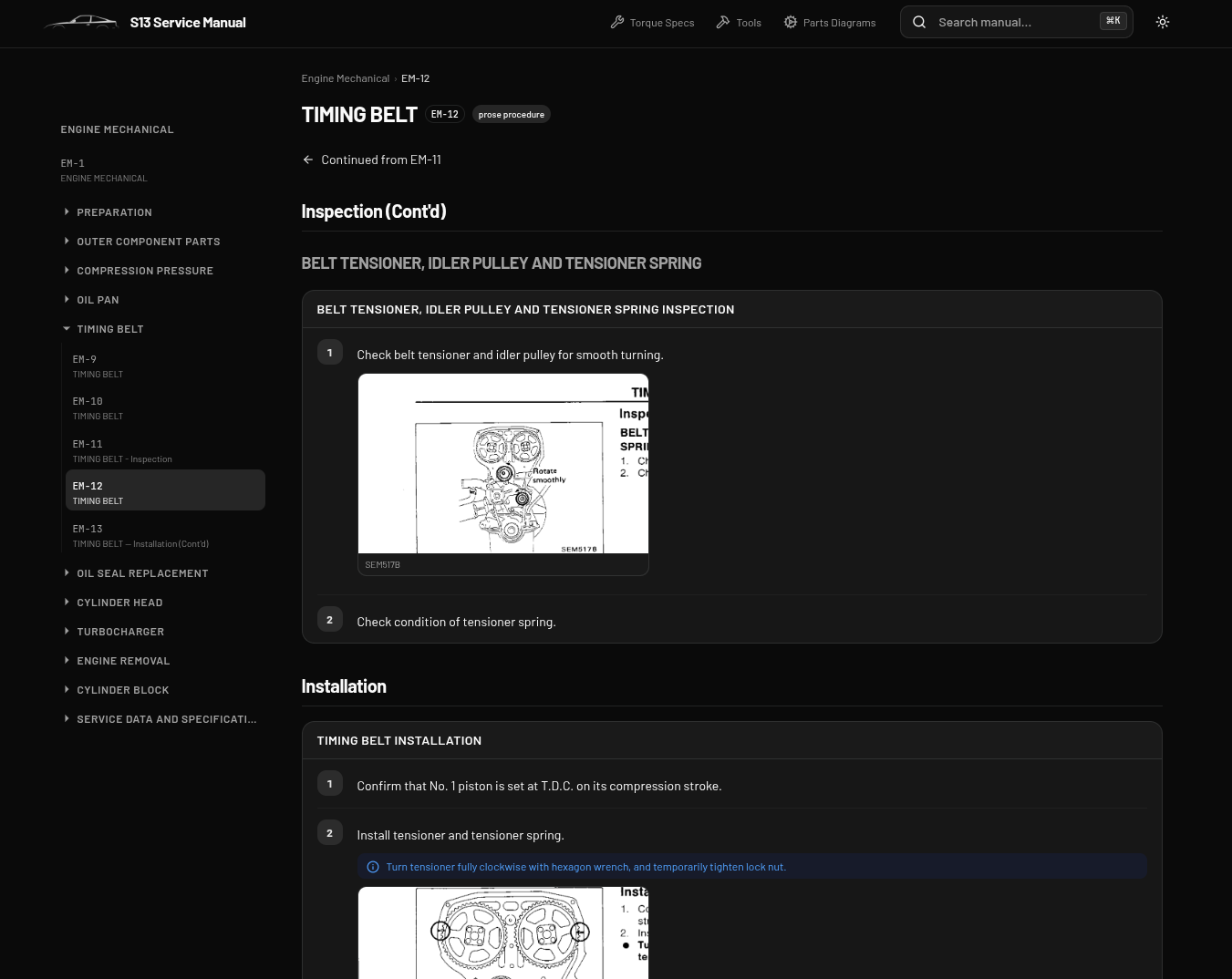
The viewer side is a single Next.js 16 app, statically exported and served from Cloudflare. The clever bit is that the same codebase serves N car models. Each model lives in its own data repo (s13-data, k11-data) attached as a submodule, holding manual.json (site config, sections), one JSON per page, and the figure images. Adding a new model is “create a new data repo, point at it, deploy”. No per-model code.
Every extracted page is a list of typed blocks, and every block type has its own React renderer: procedure, specs, flowchart (rendered with Mermaid), table, component_location, parts_diagram, wiring_schematic, diagnostic_code, plus the boring heading and prose ones.
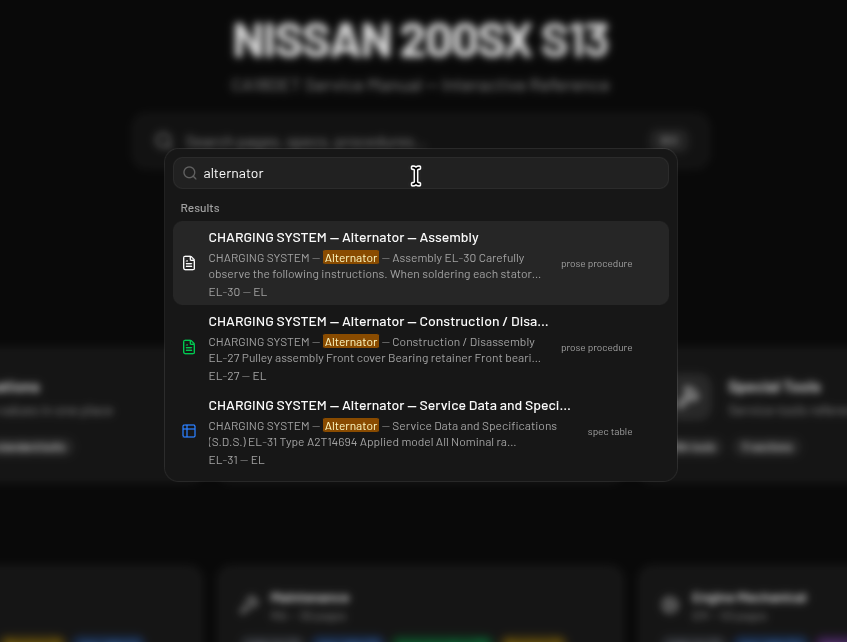
Search is fully client-side via MiniSearch, with the index pre-built at compile time and shipped as a static JSON file. Hit Cmd+K and you’re typing. No server, no API call, no cold start.
Numbers so far
- S13: 526 pages extracted, ~1,400 figures
- K11: 625 pages extracted, ~1,400 figures
- Total: north of 1,150 pages and 2,800 images of structured workshop content
Two manuals, one codebase, zero servers.
What’s next
More models are the obvious next step. The sucatisse name was always meant to cover more than one car. Mobile polish is on the list (the use case is genuinely “phone propped on the wing while elbow-deep in the engine bay”). And I’d like to clean up human-touch enough to share with other people restoring old machines, because I doubt I’m the only one whose service manual is a 30-year-old PDF that was never meant to be read on a screen.
If you’re tinkering with something old and badly documented, ping me. There’s probably a manual for it that deserves the same treatment.
bought a 200sx. only repair info = 500 page workshop manual scanned from a 1990s binder. cmd+f and patience. so im building the clickable searchable mobile version
project name sucatisse (portuguese-ish slang for scrappy stuff). two manuals live:
- s13.sucatisse.com: Nissan 200sx (S13)
- k11.sucatisse.com: Nissan K11
same codebase same pipeline. first post of probably a few
pages are dense. torque table + exploded diagram + procedure + flowchart on one A4, cross refs like FA-3, EM-12. pure ocr = wall of text, useless. want structured blocks: procedure, specs, flowchart, parts_diagram, wiring_schematic. claude job
loop: annotate pdf in human-touch (tool i built), design the extraction prompt + json schema with claude code on a few sample pages, then anthropic batch api over the whole manual. ~50% cheaper per token, dont care about throughput, queue 500+ pages and sleep. one request per page, one json out. spot check the rendered manual, fix annotations, rerun bad pages. repeat til diffs get boring
human-touch: vite + react spa, pdf loads client side via pdfjs-dist. label pages (important/ignore/cover/section_divider/index_toc/blank), draw boxes around figures (figure/diagram/photo/schematic/table), leave notes. autosaves to OPFS keyed by pdf hash, exports a json sidecar for the extractor. unglamorous but its the 90% → 99% part
frontend: one next.js 16 app, static export on cloudflare. per car data repos as submodules (s13-data, k11-data), manual.json + one json per page + images. new car = new data repo, deploy. every block type has a react renderer, flowcharts via mermaid
search is minisearch, index prebuilt at compile time, cmd+k. no server
numbers: s13 526 pages ~1400 figures, k11 625 pages ~1400 figures. 1150+ pages, 2800 images. zero servers 🔧
next: more cars, mobile polish (phone on the wing, oily hands), maybe clean up human-touch to share. got an old badly documented machine? ping me
I bought a Nissan 200sx, and the only proper repair info for it is a 500-page workshop manual scanned out of a 1990s binder: grainy diagrams, torque tables, and a lot of Cmd+F. So I built the version I wanted: clickable, searchable, and mobile-friendly.
The project is called sucatisse (Portuguese-flavoured slang for “scrappy stuff”) and hosts two manuals so far:
- s13.sucatisse.com: Nissan 200sx (S13)
- k11.sucatisse.com: Nissan K11
Same codebase, same pipeline, different car. This is the first post in a small series.
The data
Workshop manual pages are dense and cross-referenced by code (FA-3 for Front Axle page 3, EM-12 for Engine Mechanical page 12). A single A4 can hold a torque table, a numbered exploded diagram, a procedure pointing at that diagram, and a fault-finding flowchart. Pure OCR flattens all of that into a wall of text. What I want is structured blocks: a procedure, a specs table, a flowchart, a parts_diagram, a wiring_schematic. Exactly the kind of job Claude is good at.
The pipeline
The flow is an iterative loop, not a one-shot batch:
- Annotate the PDF in human-touch, a tool I built. Mark cover, index, and blank pages as ignore; draw bounding boxes around figures; note weird pages.
- Design the extraction with Claude Code, iterating on the prompt and target JSON schema against a few representative pages. Fastest way I’ve found to converge on the right prompt without burning money on bad batch jobs.
- Run the Anthropic batch API over the rest. Batching is roughly 50% cheaper per token, and throughput doesn’t matter when you queue 500+ pages and go to bed. One page per request, one structured JSON file out.
- Spot-check the rendered manual for dropped figures, mislabelled torque values, or hallucinated steps.
- Loop back: tighten a figure box, leave a note for the extractor, re-run just that page. Repeat until the diff between runs stops being interesting.
human-touch
A small Vite + React SPA that loads the PDF entirely client-side via pdfjs-dist. I label each page (important / ignore / cover / section_divider / index_toc / blank), draw labelled bounding boxes (figure / diagram / photo / schematic / table), and leave free-text notes that flow to the extractor. Annotations auto-save to OPFS, fingerprinted by the PDF’s hash, and export as a JSON sidecar the extractor reads alongside the PDF.
Unglamorous, but it’s the difference between “Claude got it 90% right” and “99% right where it counts.” For a manual you consult with oily hands, that last 9% matters.
The frontend
One Next.js 16 app, statically exported, served from Cloudflare. The same codebase serves N car models: each model is a data repo (s13-data, k11-data) attached as a submodule, holding manual.json, one JSON per page, and the figure images. A new model is “create a data repo, point at it, deploy.”
Every page is a list of typed blocks, and each type has its own React renderer: procedure, specs, flowchart (Mermaid), table, component_location, parts_diagram, wiring_schematic, diagnostic_code, plus heading and prose.
Search is fully client-side via MiniSearch, with the index pre-built at compile time and shipped as static JSON. Cmd+K and you’re typing.
Numbers so far
- S13: 526 pages extracted, ~1,400 figures
- K11: 625 pages extracted, ~1,400 figures
- Total: north of 1,150 pages and 2,800 images
Two manuals, one codebase, zero servers.
What’s next
More models, mobile polish (the real use case is a phone propped on the wing), and cleaning up human-touch enough to share with other people restoring old machines. If you’re tinkering with something old and badly documented, ping me.
A while back, I purchased a Nissan 200sx, and in doing so, I stepped into a fascinating corner of the automotive documentation landscape. The only proper repair information that exists for this car is a 500-page workshop manual scanned out of a 1990s binder, complete with grainy diagrams and dense torque tables that you navigate with Cmd+F and a considerable amount of patience. It quickly became clear that this wasn’t just an inconvenience, it was an opportunity. So I began building the thing I actually wanted: a real, clickable, searchable, mobile-friendly version of that manual.
What started as a simple side project has since grown an umbrella name, sucatisse (Portuguese-flavoured slang for “scrappy stuff”), and it now hosts two complete manuals:
- s13.sucatisse.com: Nissan 200sx (S13)
- k11.sucatisse.com: Nissan K11
Same codebase, same pipeline, different car. This post is the first in what will probably be a small series, and in it, we’ll delve into the high-level shape of how the sausage gets made.
The shape of the data
It’s important to note that workshop manuals look deceptively simple from across the room and become genuinely intimidating up close. The pages are dense, figure-heavy, and extensively cross-referenced by code (FA-3 for Front Axle page 3, EM-12 for Engine Mechanical page 12, and so on). A typical page seamlessly combines a torque table, a numbered exploded diagram, a step-by-step procedure that points back at the diagram, and a fault-finding flowchart, all coexisting on a single A4 sheet.
When we delve into what pure OCR does with content like this, the limitations become apparent: it turns everything into an undifferentiated wall of text and loses precisely the structure that made the page useful in the first place. What I actually want is structured blocks: a procedure, a specs table, a flowchart, a parts_diagram, a wiring_schematic. These aren’t just data formats, they’re first-class UI elements the frontend can render meaningfully instead of dumping back the original photocopy.
Which, as it turns out, is exactly the kind of job Claude excels at.
The pipeline
The flow ultimately evolved into an iterative loop rather than a one-shot batch, and this distinction matters more than it might initially appear:
- Annotate the PDF in a custom tool I built called human-touch (more on that shortly). Mark cover, index, and blank pages as ignore. Draw bounding boxes around figures so the extractor knows precisely what to pull out as images. Drop notes on unusual pages.
- Design the extraction with Claude Code. I would point Claude Code at a small handful of representative pages and iterate on the prompt and the target JSON schema interactively. Claude Code is genuinely brilliant for this kind of work. It’s the fastest way I’ve found to converge on “the prompt that produces the JSON I actually want” without burning real money on unsuccessful batch jobs.
- Run the Anthropic batch API over the rest of the manual. Once the prompt is properly dialled in, leveraging the batch API is a no-brainer for this workload: it’s approximately 50% cheaper per token, and throughput genuinely doesn’t matter when you’re queueing 500+ pages and going to bed. Each page becomes one batch request, and the output is one structured JSON file.
- Spot-check the output. Open the rendered manual and click through it methodically. Find the page where the model dropped a figure, mis-labelled a torque value, or hallucinated a step that wasn’t there.
- Loop back into human-touch. Tighten the figure box, leave a note for the extractor (“the spec table on this page has a footnote, include it”), and re-run just that page through the API. Repeat until the diff between runs stops being interesting.
Two things made this loop work robustly in practice: Claude Code for the design phase, and human-touch for the correction phase. Together, they form a workflow that is efficient, repeatable, and surprisingly pleasant.
human-touch: the missing piece
human-touch is a small Vite + React SPA that I built specifically to handle the annotation half of the loop, and it turned out to be the piece that holds everything together.
It loads a PDF entirely client-side via pdfjs-dist, allows me to label each page (important / ignore / cover / section_divider / index_toc / blank), draw bounding boxes around figures with a label (figure / diagram / photo / schematic / table), and leave free-text notes that flow seamlessly through to the extractor. Everything is auto-saved to OPFS (the browser’s Origin Private File System), fingerprinted by the PDF’s hash, which means my annotations survive reloads without ever leaving the laptop. There’s an export button that produces a JSON sidecar, and that sidecar is what the extractor reads alongside the raw PDF.
It’s undeniably the unglamorous part of the project, but it’s important to note that it’s also the part that makes the difference between “Claude got it 90% right” and “Claude got it 99% right where it counts.” For a workshop manual that someone is going to consult while their hands are covered in oil, that last 9% isn’t just a nice-to-have, it’s essential.
The frontend
The viewer side is a single Next.js 16 app, statically exported and served from Cloudflare. The clever bit, and it really is quite elegant, is that the same codebase serves N car models. Each model lives in its own dedicated data repository (s13-data, k11-data) attached as a submodule, holding manual.json (site config, sections), one JSON file per page, and the figure images. Adding a new model is as simple as “create a new data repo, point at it, deploy”. No per-model code, no duplication, no maintenance burden.
Every extracted page is a list of typed blocks, and every block type has its own dedicated React renderer: procedure, specs, flowchart (rendered with Mermaid), table, component_location, parts_diagram, wiring_schematic, diagnostic_code, plus the more mundane heading and prose blocks.
Search is fully client-side via MiniSearch, with the index pre-built at compile time and shipped as a static JSON file. Hit Cmd+K and you’re typing immediately. No server, no API call, no cold start. The experience is genuinely seamless.
Numbers so far
Let’s take a moment to look at the concrete results this pipeline has delivered:
- S13: 526 pages extracted, ~1,400 figures
- K11: 625 pages extracted, ~1,400 figures
- Total: north of 1,150 pages and 2,800 images of structured workshop content
Two manuals, one codebase, zero servers. It’s a testament to how far a well-designed pipeline can take a project.
What’s next
More models are the obvious next step in this journey. The sucatisse name was always intended to cover more than one car. Mobile polish is firmly on the list as well, since the use case is genuinely “phone propped on the wing while elbow-deep in the engine bay.” And I’d like to clean up human-touch enough to share it with other people restoring old machines, because I strongly doubt I’m the only one whose service manual is a 30-year-old PDF that was never meant to be read on a screen.
Whether you’re restoring a classic car, reviving an old motorcycle, or simply tinkering with something old and badly documented, ping me. There’s probably a manual for it that deserves the same treatment.
🚗 In today’s fast-paced, hyper-connected world, where information is expected to be instant, searchable, and available at the tap of a thumb, there remains one stubborn frontier that time seems to have forgotten: the humble automotive workshop manual. Have you ever tried to repair a beloved classic car using nothing but a decades-old scanned PDF? Have you ever squinted at a grainy exploded diagram at 11 PM, wondering whether that smudge is a bolt or a coffee stain? If so, dear reader, this post is for you.
A while back, I embarked on what I can only describe as a transformative automotive journey: I bought a Nissan 200sx. It’s a wonderful machine, a true icon of its era, but here’s the catch, and it’s a significant one: the only proper repair information that exists for this vehicle is a 500-page workshop manual scanned out of a 1990s binder, a veritable labyrinth of grainy diagrams and torque tables that you navigate with Cmd+F and a truly heroic amount of patience. It wasn’t just frustrating, it was a call to action. So I rolled up my sleeves and started building the thing I had always dreamed of: a real, clickable, searchable, mobile-friendly version of that manual. A digital renaissance for analog knowledge, if you will.
That humble side project has since blossomed into something far greater, growing an umbrella name, sucatisse (Portuguese-flavoured slang for “scrappy stuff”), and it now proudly hosts not one but two complete interactive manuals:
- s13.sucatisse.com: Nissan 200sx (S13)
- k11.sucatisse.com: Nissan K11
Same codebase, same pipeline, different car. Isn’t that remarkable? This post is the first in what will probably become a small series, a multi-part odyssey through the fascinating world of document extraction. Today, we’ll explore the high-level shape of how the sausage gets made. Buckle up! 🎢
The Shape of the Data: A Deceptively Complex Tapestry 📄
Let’s begin our journey by taking a moment to truly appreciate the challenge at hand. Workshop manuals, you see, look remarkably simple from across the room, and then become genuinely terrifying up close. It’s a classic case of hidden complexity, and it’s crucial that we unpack it together.
Consider the anatomy of a typical page:
- Dense, figure-heavy layouts: Every square centimeter of the page is working overtime.
- Cross-references by cryptic code:
FA-3for Front Axle page 3,EM-12for Engine Mechanical page 12, and so on, a navigation system designed for paper, not pixels. - Multiple content types coexisting: A torque table, a numbered exploded diagram, a step-by-step procedure that points back at the diagram, and a fault-finding flowchart, all sharing a single A4 sheet in perfect, chaotic harmony.
Now, here’s where things get truly interesting. What happens when you throw pure OCR at this rich tapestry of information? Disaster, that’s what. Pure OCR transforms this masterpiece of technical communication into an undifferentiated wall of text, ruthlessly stripping away everything that made it useful in the first place. The structure, the relationships, the visual logic, all gone.
What I actually wanted, what this project fundamentally demanded, was structured blocks: a procedure, a specs table, a flowchart, a parts_diagram, a wiring_schematic. These aren’t merely data formats, dear reader. They are first-class citizens of the user interface, elements the frontend can render as beautiful, purposeful UI instead of dumping back the original photocopy like some digital archaeology exhibit.
And which cutting-edge technology is uniquely suited to this exact kind of challenge? You guessed it: Claude. 🤖
The Pipeline: An Iterative Symphony 🔄
One of the most profound lessons of this entire endeavor was this: the flow ended up being an iterative loop, not a one-shot batch. Let that sink in for a moment. In a world obsessed with automation, sometimes the true game-changer is embracing the loop. Here’s how the magic unfolds, step by glorious step:
- Annotate the PDF in a custom tool I built called human-touch (more on this unsung hero in a moment). Mark cover, index, and blank pages as ignore. Draw bounding boxes around figures so the extractor knows exactly what to pull out as images. Drop notes on weird pages. Every annotation is an investment in quality.
- Design the extraction with Claude Code. I would point Claude Code at a small handful of representative pages and iterate on the prompt and the target JSON schema interactively. And let me tell you, Claude Code is absolutely brilliant for this. It is, without exaggeration, the fastest way I’ve found to converge on “the prompt that produces the JSON I actually want” without burning real money on bad batch jobs. Talk about a win-win!
- Run the Anthropic batch API over the rest of the manual. Once the prompt is dialled in, batching becomes an absolute no-brainer for this workload: approximately 50% cheaper per token, and throughput genuinely doesn’t matter when you’re queueing 500+ pages and going to bed. Yes, you read that correctly, the pipeline works while you sleep! Each page becomes one batch request, and the output is one beautiful, structured JSON file.
- Spot-check the output. Open the rendered manual, click through with a discerning eye. Find the page where the model dropped a figure, mis-labelled a torque value, or hallucinated a step that simply wasn’t there. Vigilance is the price of quality.
- Loop back into human-touch. Tighten the figure box, leave a note for the extractor (“the spec table on this page has a footnote, include it”), and re-run just that page through the API. Repeat until the diff between runs stops being interesting.
What made this loop truly sing in practice? Two things, working in perfect harmony: Claude Code for the design phase, and human-touch for the correction phase. Together, they form a workflow that isn’t just functional, it’s genuinely delightful. And isn’t that what great tooling is all about? When your tools disappear into the background and let you focus on the craft itself, you know you’ve built something special. This loop, humble as it may seem, is the beating heart of the entire operation, the engine room of the sucatisse ship, if you’ll permit me one more automotive metaphor on this automotive blog.
human-touch: The Unsung Hero of the Story 🛠️
Every great project has its secret weapon, and for sucatisse, that weapon is human-touch, a small but mighty Vite + React SPA that I built specifically for the annotation half of the loop.
What does this remarkable little tool bring to the table? Allow me to enumerate its capabilities:
- Fully client-side PDF loading: It loads a PDF entirely in the browser via
pdfjs-dist. No uploads, no servers, no waiting. - Comprehensive page labeling: Each page can be classified as
important/ignore/cover/section_divider/index_toc/blank, bringing order to chaos. - Precision bounding boxes: Draw boxes around figures with a label (
figure/diagram/photo/schematic/table), telling the extractor exactly what matters. - Free-text notes: Leave contextual guidance that flows directly through to the extractor. It’s like leaving breadcrumbs for your future self.
- Bulletproof persistence: Everything is auto-saved to OPFS (the browser’s Origin Private File System), fingerprinted by the PDF’s hash, meaning my annotations survive reloads without ever leaving the laptop. Privacy and durability, hand in hand.
- One-click export: An export button produces a JSON sidecar, and that sidecar is precisely what the extractor reads alongside the raw PDF.
Is it the glamorous part of the project? Absolutely not. But here’s the profound truth at the heart of this story: it’s the part that makes the difference between “Claude got it 90% right” and “Claude got it 99% right where it counts.” And for a workshop manual that someone is going to consult while their hands are covered in oil, that last 9% isn’t just important, it’s everything. 💪
The Frontend: Where the Magic Comes Alive ✨
Now let’s turn our attention to the viewer side, where all of this painstaking extraction work finally meets its audience. The frontend is a single Next.js 16 app, statically exported and served from Cloudflare, a modern, robust, and remarkably cost-effective architecture.
But here’s the truly clever bit, the architectural decision that elevates this from “nice project” to “scalable platform”: the same codebase serves N car models. How is this achieved, you ask? Through an elegant separation of concerns:
- Dedicated data repositories: Each model lives in its own data repo (
s13-data,k11-data) attached as a submodule. - Structured content: Each repo holds
manual.json(site config, sections), one JSON file per page, and the figure images. - Effortless expansion: Adding a new model is simply “create a new data repo, point at it, deploy”. No per-model code. None. Zero.
Every extracted page is a list of typed blocks, and every single block type has its own dedicated React renderer: procedure, specs, flowchart (rendered with Mermaid), table, component_location, parts_diagram, wiring_schematic, diagnostic_code, plus the humble but essential heading and prose. A component for every occasion!
And what about search, the beating heart of any reference tool? Search is fully client-side via MiniSearch, with the index pre-built at compile time and shipped as a static JSON file. Hit Cmd+K and you’re typing. No server. No API call. No cold start. Just pure, instantaneous, frictionless discovery. Is there anything more satisfying? 🔍
The Numbers So Far: Let the Results Speak 📊
They say the proof of the pudding is in the eating, so let’s feast on some metrics:
- S13: 526 pages extracted, ~1,400 figures
- K11: 625 pages extracted, ~1,400 figures
- Total: north of 1,150 pages and 2,800 images of structured workshop content
Two manuals. One codebase. Zero servers. If that’s not a testament to the power of a well-designed pipeline, I don’t know what is. Every one of those pages was once trapped in a scanned binder, unsearchable and unloved, and now each one is a living, structured, clickable piece of the web. That, dear reader, is what transformation looks like in practice.
What’s Next: The Road Ahead 🛣️
No journey worth taking ever truly ends, and sucatisse is no exception. So what does the future hold for this ever-evolving project?
- More models: The obvious next step. The sucatisse name was always meant to cover more than one car, and the pipeline is hungry for its next challenge.
- Mobile polish: Because the use case is genuinely “phone propped on the wing while elbow-deep in the engine bay,” and that experience deserves to be flawless.
- Sharing human-touch with the world: I’d like to clean up human-touch enough to share with other people restoring old machines, because I sincerely doubt I’m the only one whose service manual is a 30-year-old PDF that was never meant to be read on a screen.
Conclusion: More Than Just Manuals 🌅
As we reach the end of today’s deep dive, let’s take a moment to reflect on what this project truly represents. It’s not just about a Nissan 200sx, or a K11, or even about PDFs. It’s about the timeless dance between human craftsmanship and machine intelligence, between a 1990s binder and a 2020s browser, between the past we cherish and the future we’re building, one bounding box at a time.
Whether you’re a seasoned mechanic, a weekend restorer, or simply someone who believes that old machines deserve modern documentation, I hope this journey has inspired you. If you’re tinkering with something old and badly documented, please, ping me. There’s probably a manual for it that deserves the same treatment, and together, we can give these forgotten documents the second life they so richly deserve.
Thank you, truly and deeply, for reading. Until next time, keep your torque wrenches calibrated and your curiosity unbounded! 🔧✨